SteelSeries Rival 5
Supported Models
SteelSeries Rival 5 |
1038:183c |
SteelSeries Rival 5 Destiny Edition |
1038:183e |
Missing Features
The following feature are currently not supported by Rivalcfg:
Selective rainbow effect (rainbow effect on some LEDs only instead of all LEDs).
Command-Line Usage
usage: rivalcfg [-h] [--list] [--version] [--no-save] [--update-udev]
                [--print-udev] [--print-debug] [-s SENSITIVITY]
                [-p POLLING_RATE] [-C WHEEL_COLOR]
                [--left-strip-top-color Z2_COLOR]
                [--right-strip-top-color Z3_COLOR]
                [--left-strip-middle-top-color Z4_COLOR]
                [--right-strip-middle-top-color Z5_COLOR]
                [--left-strip-middle-bottom-color Z6_COLOR]
                [--right-strip-middle-bottom-color Z7_COLOR]
                [--left-strip-bottom-color Z8_COLOR]
                [--right-strip-bottom-color Z9_COLOR] [-c LOGO_COLOR]
                [-a REACTIVE_COLOR] [-l LED_BRIGHTNESS] [-b BUTTONS_MAPPING]
                [-e] [-d DEFAULT_LIGHTING] [-r]

options:
  -h, --help            show this help message and exit
  --list                List supported devices and exit
  --version             show program's version number and exit
  --no-save             Do not persist settings in the internal device memory
  --update-udev         Updates udev rules (Linux only, requires to be run as
                        root)
  --print-udev          Prints udev rules and exit
  --print-debug         Prints debug information and exit

SteelSeries Rival 5 Options:
  -s, --sensitivity SENSITIVITY
                        Set sensitivity presets (DPI) (up to 5 settings, from
                        100 dpi to 18000 dpi, default: '400, 800, 1200, 2400,
                        3200')
  -p, --polling-rate POLLING_RATE
                        Set polling rate (Hz) (values: 125, 250, 500, 1000,
                        default: 1000)
  -C, --wheel-color, --z0 WHEEL_COLOR
                        Set the color of the wheel LED (e.g. red, #ff0000,
                        ff0000, #f00, f00, default: #ff1800)
  --left-strip-top-color, --z2 Z2_COLOR
                        Set the color of the top LED of the left strip (e.g.
                        red, #ff0000, ff0000, #f00, f00, default: #ff1800)
  --right-strip-top-color, --z3 Z3_COLOR
                        Set the color of the top LED of the right strip (e.g.
                        red, #ff0000, ff0000, #f00, f00, default: #ff1800)
  --left-strip-middle-top-color, --z4 Z4_COLOR
                        Set the color of the middle top LED of the left strip
                        (e.g. red, #ff0000, ff0000, #f00, f00, default:
                        #ff1800)
  --right-strip-middle-top-color, --z5 Z5_COLOR
                        Set the color of the middle top LED of the right strip
                        (e.g. red, #ff0000, ff0000, #f00, f00, default:
                        #ff1800)
  --left-strip-middle-bottom-color, --z6 Z6_COLOR
                        Set the color of the middle bottom LED of the left
                        strip (e.g. red, #ff0000, ff0000, #f00, f00, default:
                        #ff1800)
  --right-strip-middle-bottom-color, --z7 Z7_COLOR
                        Set the color of the middle bottom LED of the right
                        strip (e.g. red, #ff0000, ff0000, #f00, f00, default:
                        #ff1800)
  --left-strip-bottom-color, --z8 Z8_COLOR
                        Set the color of the bottom LED of the left strip
                        (e.g. red, #ff0000, ff0000, #f00, f00, default:
                        #ff1800)
  --right-strip-bottom-color, --z9 Z9_COLOR
                        Set the color of the bottom LED of the right strip
                        (e.g. red, #ff0000, ff0000, #f00, f00, default:
                        #ff1800)
  -c, --logo-color, --z1 LOGO_COLOR
                        Set the color of the logo LED (e.g. red, #ff0000,
                        ff0000, #f00, f00, default: #ff1800)
  -a, --reactive-color REACTIVE_COLOR
                        Set the color of the LEDs in reaction to a button
                        click (e.g. off, disable, red, #ff0000, ff0000, #f00,
                        f00, default: white)
  -l, --led-brightness LED_BRIGHTNESS
                        Set the brightness of the LEDs (values: 0, 25, 50, 75,
                        100, default: 100)
  -b, --buttons BUTTONS_MAPPING
                        Set the mapping of the buttonsX (default:
                        buttons(button1=button1; button2=button2;
                        button3=button3; button4=button4; button5=button5;
                        button6=disabled; button7=disabled; button8=disabled;
                        button9=dpi; scrollup=scrollup; scrolldown=scrolldown;
                        layout=qwerty))
  -e, --rainbow-effect  Enable the rainbow effect (can be disabled by setting
                        a color)
  -d, --default-lighting DEFAULT_LIGHTING
                        Set default lighting at mouse startup, Reactive-color
                        must be toggled separately! (values: off, rainbow,
                        default: rainbow)
  -r, --reset           Reset all settings to their factory default

Please report any bug on Github: https://github.com/flozz/rivalcfg/issues
Sensitivity (DPI)
This mouse supports up to 5 sensitivity presets (short option: -s).
You can define them like this:
rivalcfg --sensitivity 800       # one preset
rivalcfg --sensitivity 800,1600  # two presets
You can switch preset using the button under the mouse wheel.
Note
When you set the sensitivity through the CLI, the selected preset always back to the first one.
Polling Rate
Use --polling-rate (short option: -p) to set the polling rate (in Hz).
Supported values are
125, 250, 500 and 1000.
Colors
This mouse supports colors. Various formats are supported.
Hexadecimal notation
You can use a 24 bit hexadecimal notation (like in HTML / CSS documents). Example of “red” color using hexadecimal notation:
#FF0000FF0000#F00F00
Named Colors
The folowing named colors are supported:
|
|
|
|
|
|
|
|
|
|
|
|
|
|
|
|
RGB Tuple (Python API only)
If you are using the Python API (not the command line interface), you can
also pass colors as RGB tuple or list:
(255, 0, 0)[255, 0, 0]
Important
On newer SteelSeries mice, the color settings are not saved in the onboard memory anymore (see Default Lighting bellow).
Reactive Color
The reactive color changes LED colors when you click a button. You can disable
it with off or disable. Example:
rivalcfg --reactive-color off
rivalcfg --reactive-color white
LED Brightness
Use --led-brightness (short option: -l) to set the brightness in
percent. Supported values are
100, 75, 50, 25 and 0.
Rainbow Effects
Use --rainbow-effect (short option: -e) to enable the onboard rainbow
effect on all LEDs.
You can also set this effect as default at startup using the --default-lighting rainbow option (see bellow).
Default Lighting
The color setting is not saved in the onboard memory on this device. You can only define if the light goes blank or rainbow at startup.
Supported values are:
off: All LEDs are off when the mouse wakes up.rainbow: LEDs display an animated rainbow effect when the mouse wakes up.
Examples:
rivalcfg --default-lighting off
rivalcfg --default-lighting rainbow
Buttons
Use --buttons (short option: -b) to change the button mapping.
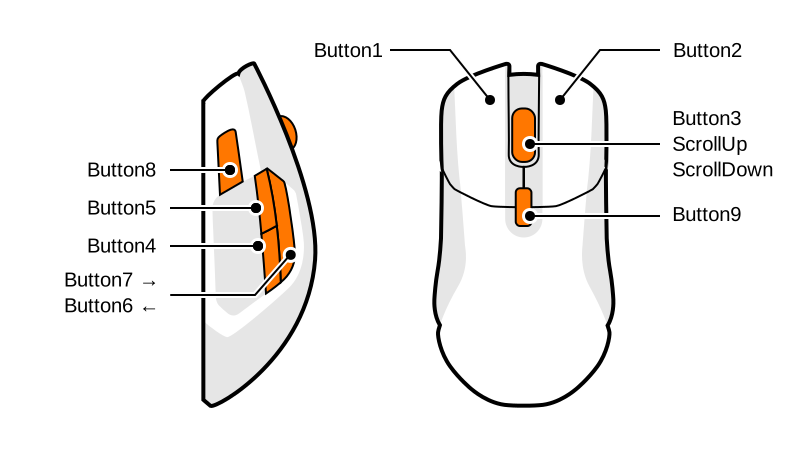
This mouse supports buttons mapping. Buttons can be mapped with:
some special actions,
mouse buttons,
multimedia keys,
and keyboard keys.
The general syntax for buttons mapping is the following:
buttons(layout=<LAYOUT>; button1=<mapping1>; buttonN=<mappingN>)
Example:
rivalcfg --buttons "buttons(layout=QWERTY; button1=button1; button2=PlayPause; button3=disabled; button5=A; button6=DPI)"
Arguments:
layout: The keyboard layout to use when papping the keys (see the “Mapping Keyboard Keys” section bellow).button1: The first button of the mouse.button2: The second button of the mouse.buttonN: The Nth button of the mouse (The number of available buttons depends of the mouse model).
Note
All parameters are optional. If you do not define a mapping for a specific button, it will be reset to its default value.
You can also reset all buttons to their factory default by passing "default" as parameter:
rivalcfg --buttons default
Warning
Be sure to map the mouse button button1 on some button, else you will not be able to click with the mouse!
Mapping Special Actions
The following special actions are available¹:
disabled: disable the button,dpi: use this button to switch between DPI presets,ScrollUp: simulate a scroll up (not available on all devices¹)ScrollDown: simulate a scroll down (not available on all devices¹)
Example:
buttons(button4=disabled; button5=disabled; button6=DPI)
Note
¹ The ScrollUp and ScrollDown actions are not available on all devices.
Rival 300 / Rival: OK
Sensei [RAW]: Not supported
Mapping Multimedia Keys
Mouse buttons can be mapped to multimedia keys. The following keys are available:
Mute: turn off the soundNext: play next mediaPlayPause: toggle play / pause on the currently playing mediaPrevious: play the previous mediaVolumeUp: increase the volumeVolumeDown: decrease the volume
Example:
buttons(button4=VolumeDown; button5=VolumeUp)
Mapping Keyboard Keys
Mouse buttons can be mapped to any keyboard key, using different layouts.
To select the desired layout, just use the layout parameter. If this
parameter is not specified, the QWERTY layout will be used by default.
Available layouts:
QWERTY(see available keys)
The available keys depend on the selected layout.
Example:
buttons(layout=QWERTY; button7=PageDown; button8=PageUp)
Note
Some characters like ; or = cannot be used as a key identifier as they
interfere with the buttons() syntax. For those keys, use one of the
available aliases, like semicolon (instead of ;) or equal
(instead of =).
Example:
buttons(button4=semicolon; button5=equal)
Python API
TODO